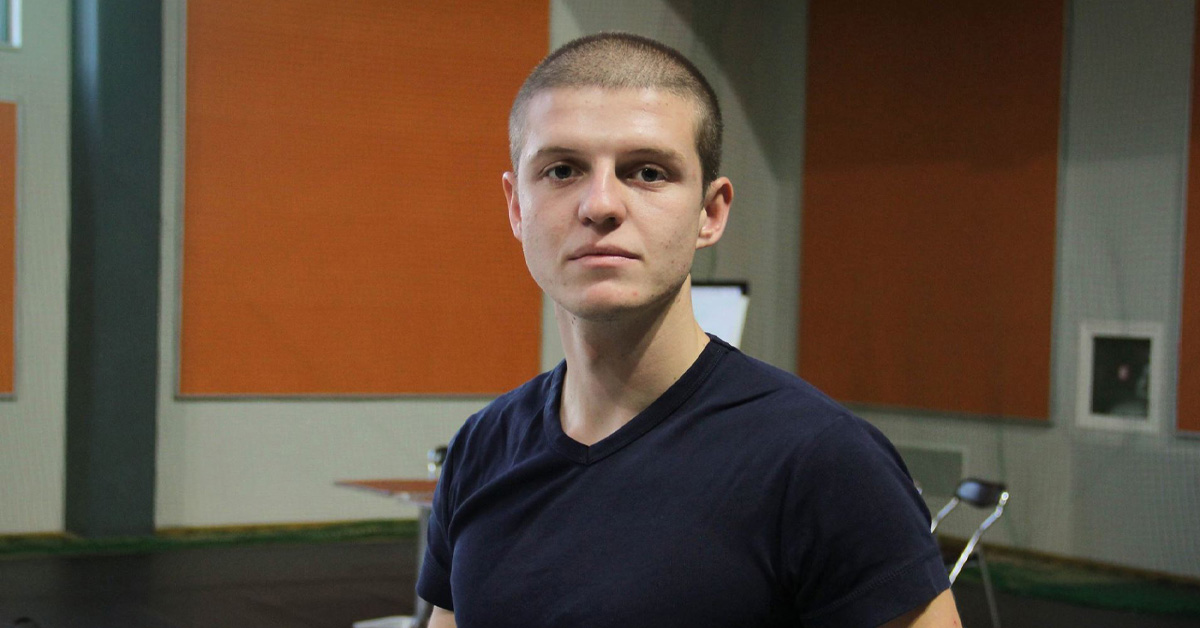
Protecting Your Vision Using ‘Iris’ | with Daniel Georgiev


About Episode
For those of us who spend most of our waking hours sitting in front of screens (i.e. ALL of us), we’ve learned a lot recently about the negative health effects of screen exposure, especially when it comes to eye health. I’ve seen a lot of activity in Facebook groups in the last few months especially about eye health and protecting yourself from blue light. I’ve done past podcasts with sleep experts such as Shawn Stevenson and Ben Greenfield about how to get better sleep in part by limiting exposure to blue light in the latter half of the day, but I’ve yet to have an expert on the podcast to talk specifically about what can be done to limit the health problems created by looking at computer screens all day.
In this episode I chat with Daniel Georgiev, a young but extremely talented computer programmer from Bulgaria who created the software program Iris which is now an indispensable tool in my toolkit. I’ve talked about F.lux many times in the past and recommended it for years, but now my #1 recommendation for eye health if you work in front of a computer is Iris. I have it installed on every computer I own and can’t live without it. Daniel and I talk about how Iris works, why he created it, and more importantly what you can do to mitigate the negative effects on your eyes of working on computers for long hours.
Daniel was also kind enough to offer an activation code for a free activation of either Iris Pro or Iris Mini Pro. He’s offering 100 activations of each, first-come first-served. Just use the coupon code “team-optimize” at zackarnold.com/iris to get your free license.
NOTE: In order to activate, you must download the free version first and then activate the full version with your code.
Episode Highlights
- How damaging can staring at a computer be?
- Eye exercises that combat eye strain
- What effects flickering LED displays have on your irises
- Daniel’s experience with eye strain and extended exposure to monitor light
- How blue light an inappropriate times can cause macular degeneration
- Blue light’s damaging effects aren’t limited to just nighttime
- How Iris improves eye health over the course of the entire day
- Ways in which low monitor brightness can be just damaging as high brightness
- How typographical, color, and brightness standards are threatening our vision
Useful Links
Transcript
Zack Arnold: I’m here today with Daniel Georgiev, and I’m. I hope that I didn’t completely butcher your name, did I?
Daniel Georgiev: It was great.
Zack Arnold: Okay, awesome. Well, that makes me feel better. We were just talking beforehand about how you are in Bulgaria, and it’s 7o’clock in the morning, and for me, it’s currently 9o’clock at night. So I appreciate you jumping on this call so early in your morning, and thank you for being on the show.
Daniel Georgiev: Thank you.
Zack Arnold: So the reason that you’re here today is because I’ve had a lot of people in my program that have reached out to me and said, “I don’t really understand what’s happening to me when I stare at a computer monitor all day. You need to get an expert on to help me understand what’s happening to me when I stare at computers? Is it blue light? Is it red light? Should I be doing this? Should I be having specific fonts? Like there, there’s so many different things behind the science of living in front of computer monitors. Which I would, I would bet good money that every single person listening to this right now spends at least eight hours, if not more, staring at a computer during the day, and you have a lot to say about this topic. So I want to talk about your technology, Iris, but I don’t want to get there yet. I first just want to help people understand some of the basic knowledge that they need to know if they’re living in front of computers. So let’s just kind of start at the beginning and tell me what’s what’s the first thing I need to know if I’m going to live my life in front of a computer monitor. What should I watch out for?
Daniel Georgiev: So the first thing you need to know is that it’s pretty unhealthy actually to sit in front of the computer all day. But this is our life today. This is the world we live in, and everybody should try to stand up from the computer and look outside from time to time to help relax the eyes. Because when you look at the computer, you focus your eyes; they don’t move, and this is tiring. This is one of the reasons people start wearing glasses. There are many more reasons, but this is the main thing that people should know from time to time, to stand up and look at distant objects.
Zack Arnold: Now, when you say distant, give me like some sense because I know usually computer is going to be maybe 18 inches away from your face. Are you talking about a picture on the wall, like you know a horizon? Like what’s what are some some good exercises and distances to kind of do on a regular basis?
Daniel Georgiev: Well, I’m looking at mountains and the objects really distant from me, but everything above 25 meters is good.
Zack Arnold: Okay, so so we’re talking about trying to really look off in the distance, not just look away from my computer to a picture that’s three feet away on the wall. You’re talking about really longer distances.
Daniel Georgiev: Yes, and yawning and blinking and just moving the eyes and doing maybe not exercise but just moving the eyes a little because they’re pretty static when you look at the PC.
Zack Arnold: So if I were not doing that, if I were somebody that just stared at my computer all day long, didn’t really look away, and I’m just kind of in that creative zone over a long period of time, chronically doing that, what am I doing to the muscles in my eye? Like you’d said something about that’s why people need to wear glasses. But what’s kind of actually happening there? The
Daniel Georgiev: Muscles are just tightening. It’s a lot more complex than this. The monitor flickers all the time on the backlight. The LEDs turn on and off all the time, and the muscles of the eye start contracting. It’s like turning the light in the room on and off many times in one second, and your iris starts to open and close all the time. It’s like contracting, like a muscle. This is what happens when you look at electronic devices in phones, computers, and everything. This is why also a ink devices like Kindle are much better for dice. They don’t flicker. They don’t emit light, and they don’t make you right to tighten and lose all the time.
Zack Arnold: Sure. Okay. Well, I definitely want to jump into talking a lot about flicker and different spectrums of light, but I guess one question that I want to ask first, and I probably should have asked this as the first question, but I would really love to know a little bit more about your background and why you’re so passionate about this. Because you’re a fairly young guy, but you just seem super, super passionate about health in front of a monitor and developing a technology for. So, can you give me just a little bit of background about why you chose to go into this?
Daniel Georgiev: Yes. So, I’m 21 years old right now. I’m the creator of Iris, as you know. And I started doing this because when I was working at as a programmer in one big company, I had two monitors, and my vision was perfect my entire life as a kid. But as I started working, I was working whole day for more than eight hours, constantly not moving my eyes. I just wanted to be really good in front of the PC, and they started burning, really burning, and I started using. Eye drops at the beginning, then a lot of eye drops. I I remember how my my not war drop, but I don’t know the world. But it was full of eye drops and eye drop bottles, and it was really bad. I got to eye doctor. He prescribed me glasses, and this was the time that I decided, oh, I need to fix this. I start looking at all the programs on the internet for eye health, for how to fix my vision, reading everything. So I’m not a doctor, but Irish is really combination of all medical research and everything I found during the years to fix my own vision.
Zack Arnold: Well, and I’m I’m a big fan of people that are very upfront about the fact that they’re not experts, they’re not doctors. But at the same time, I feel like if you’re somebody that has had the problem yourself and you’ve had to solve it, a lot of times you’re going to find more information than maybe even a doctor might know because they get a specific amount of education and information, but you’re just going to find everything that applies to your situation that will help you. So I don’t think that there’s anything wrong with the fact that you may not be a you know an optometrist or you know a doctor of the eyes, because you’re somebody who’s been through this yourself. Like for example, if I were let’s say that I were an alcoholic, I would rather learn how to overcome alcoholism from somebody that’s overcome it rather than somebody that’s read a lot of books about it. And the fact that you just decided, you know what, working in front of computers was really bad for me, and I’m going to learn everything I can from all the experts and all the research, and then go above and beyond and develop this amazing technology for computer monitors. Like to me, that’s pretty amazing.
Daniel Georgiev: Yes, and it’s interesting that the first version of Iris was a programmer that just locked my computer to force me to stand up, and now this timer is also into Iris, but almost nobody uses it. Everybody uses the blue light reduction and flicker-free monitors, but this this thing can vote for years. It was not like a magic idea during a shower or something like this.
Zack Arnold: Well, as long as we’re talking about iris, then let’s just kind of dive right in because I think that in talking about how it works in the different modes, we can also dive deeper into the different areas that affect us, like blue light emission and flicker and all these other things. So let’s just start talking a little bit about what Iris is.
Daniel Georgiev: So at first, I told you that I started looking at all the programs on the internet. This was programs like Flux for blue light and I don’t work rate maybe for break reminding, but they all seemed lacking functionality. Actually, the Flux was the best programmer, but I needed manual control of the blue light. I wanted low blue light all day long because this was recommended by doctors. And I wrote to the guys several times. They didn’t respond with me, and I just decided to add blue light to iris. So iris at the moment, its main features are blue light reduction automatically during day and night, and also brightness reduction without full sweet modulation flicker, which is actually I think is the bigger problem than the blue light.
Zack Arnold: Yeah, and I definitely want to talk about that as well. But I really want to get into the blue light first. The reason that you want to remove the blue light is what? What specifically is causing like what? How is the blue light a problem for your health during the day? First of all.
Daniel Georgiev: Well, you know that the light is waves which enter the eye, and the blue light is the wave with the shorter length and highest frequency. So it enters the retina really deep. This this causes over the years macro degeneration and other bad things, and I also understand it after I started talking with a lot of eye doctors. For example, Doctor Merko was no-he’s not an eye doctor, but he was a big believer in removing all blue light also during the day. And the reason is that you need full spectrum sunlight. You don’t need just colors, and you need the whole spectrum of the sun. It has really more wavelengths, which we didn’t see, but they they have effect on our skin, on our body, and our biology. Blue light is the the most damaging of them, and this is the reason we try to remove it during the day.
Zack Arnold: Got it. Okay, so that was one of the first really cool things about Iris that I discovered and made me switch immediately, because anybody that’s listening to the show for any lengthy period of time knows that I always talk about flux. I absolutely loved it. Still think it’s a great program, but as soon as I discovered Iris and saw there. So many more features and versions and different ways to use it. I said, you know what? Let me just try out using this blue light reduction during the day, and it was stunning the difference that it made. Now there are a lot of people that listen to this that probably do image work, meaning they do color correction, and in that sense, you might have to be a little bit careful with this. But me, as a film editor, I’m not worried so much about the exact replication of an image. So I said, you know what? I’m going to try the blue light reduction. And if anybody were to walk over to my monitor, they probably wouldn’t even notice. Like with Flux, when you put it in nighttime mode, like we’re recording in my evening right now, so my computer monitors are completely red. But during the day, they would be normal. But when you do the blue light reduction during the day, nobody can even see it. But I had one of my colleagues stand in front of my computer just for a minute or two, and I said, “Just look around the monitor. Look at this. Look at that. Just kind of settle into it. And then I took the blue light reduction off, and they physically jump back and they wince their eyes and like, whoa, that is really bright. So I don’t, I didn’t realize, and I don’t think most people realize how much bright, just staggering blue light is in their face all day long that they can now remove with your program.
Daniel Georgiev: Yes, yes, and it’s actually I don’t remove all the blue light during the day. The default settings so far is certain the settings I like and use, and my eyes didn’t hurt. So it’s not like a prescription from the doctor, but you can customize this in the settings. And this is a slight reduction during the day and bigger reduction during the night to to improve your production of the hormone of sleep melatonin.
Zack Arnold: Exactly, and the the mode that I was talking about was the health mode, and maybe you can explain a little bit more, you know, specifically what you’re doing with the different frequencies, because the health mode is the one I use during the day that makes it a little less blue, but you really can’t tell. So, what specifically is health mode?
Daniel Georgiev: So, the health mode is basically what I use and what some doctors recommend. Actually, they recommend a really low value of the blue light, but people are scared at first. They don’t adapt this this quickly to the recommended settings, and the health mode is something which most people adapt really fast. They start to see the difference and they start to like the program. From there on, they can, for example, many many sport people, people who do a lot of endurance or doctors use the biohacker mode, which is really red mode. You know?
Zack Arnold: Yeah, I mean the the biohacker mode is just like this crazy combination of all these different settings, so I just put my Iris program into the biohacker mode. And just to step back for one second, for anybody that has used Flux before, it’s similar in the sense that it’s not like an application window you have to have open. It’s just right in your menu tab at the top, so it’s really easy to access. It functions in the background. I mean, how much actual space or memory does it take up? It’s got to be almost nothing. The footprint, I would guess, is very small. Correct
Daniel Georgiev: For the Iris, the the big program with the UI, it’s like I don’t know 0.5 CPU, and this is mostly the UI. When you close it, the CPU drops. But for Iris Mini and the other things which are only in the trade, only only in the trade, it doesn’t use anything basically.
Zack Arnold: Exactly. So it’s something that runs completely in the background. So all I had to do was go up to my little menu icon at the very top, and I see health mode, sleep mode, reading mode, programming, biohacker, movie, and overlay. And the biohacker is the one that you mentioned, and that’s basically inverting everything, but also making a super super deep red. And I’ve done work later in the evenings in this mode, and what I like about it is that I’m able to get more tired and wind down because I’m not getting bombarded with all the blue light, but my eyes don’t feel fatigued, and there’s nothing worse than a long day in front of the computer or a long evening, and you’re rubbing your eyes and you’re getting headaches, and just the thought of staring at it, you don’t want to do it anymore. And the biohacker mode is like the perfect combination of all that. So explain a little bit more about specifically what biohacker mode is doing?
Daniel Georgiev: Well, it basically removes all the blue light from your screen, so something like this, and it causes more other colors than blue to enter your eye, and they’re not so tiring.
Zack Arnold: And then, why go to the inversion? And I’m not sure if that’s the right word to use or not, but for somebody like again, I’m probably not using the right term, but if you were to take a film negative, it’s what a film negative would look like. Or if you’re like in Photoshop or an image program, when you invert it, everything kind of you know goes backwards and looks like solar flares. So what specifically is that mode doing for me?
Daniel Georgiev: Well, in the night, it helps reading black. Text on white background and invert it, but during during other hours you can actually use the sleep mode with the same result. It does basically the same without the inversion.
Zack Arnold: Right, and that that’s one of my favorite modes in the evening, and I want to jump into a couple of others as well. So when I go to sleep mode, is sleep mode and biohacker mode are those pretty much the same thing minus the fact that it’s inverted as far as the color spectrum goes.
Daniel Georgiev: Well, I tried to add many things to the free version. This is in the free version of Iris, so this is why I added both modes. But in the in the Pro version, you can customize basically everything.
Zack Arnold: Okay, and what are some of the areas that I can customize even further because I’m using the free mode, and it’s already way light years better than the options that you have in Flux. But let’s talk a little bit about how much further and how much deeper I can go with some of these features.
Daniel Georgiev: Well, you can customize the amount of light emit from the screen. You can customize the brightness of the screen to match your room lighting. It’s really important to match your brightness to the room lighting. Something like your monitor shouldn’t be a light source in the room. It should look like a book all the time, all the day, and all the night. For example, in the night, it should be really low brightness. If you saw the hilt mode, it reduces also the brightness during the night, and during the day there is no reduction to the brightness. But you can reduce it if you are in dark room during the day also.
Zack Arnold: Got it. And why is I? We’ve talked a lot about the light spectrum, but let’s go a little bit deeper into the actual brightness. When you say that when you’re looking at a computer. It shouldn’t be a light source. Any time I’ve ever been in a room where somebody had a computer, there’s always a glow on their face, and you could light half the room with their computer. That’s just the way that people work. I had no idea that that was an issue. Why is brightness such an issue above and beyond just like the color spectrum? For
Daniel Georgiev: Example, the the same reason with turning the light on and off, and your your eye reach starts open and closing. When the when the room is dark and your monitor is bright, the the flicker rate of the of the monitor and this turning on and off of the backlight, when it’s off, it’s complete darkness, and when it’s on, it’s complete glowing to your face. And the contractions of the eyes are much bigger. For example, when if the room was really bright and your monitor was bright, these contractions will not be so big. This happens really fast, so we actually don’t perceive it. Our brain is super smart, and we don’t perceive it. But our eyes feel this, and you can test for yourself trying to look at bright monitor in dark room and in dark monitoring dark room to see how you feel. But the science behind this is actually really simple. The contractions of the ice are actually bigger, and it’s like pumping with bigger amplitudes.
Zack Arnold: Got it. Okay, so it’s it’s similar along the lines of when we were talking about trying to look away, go longer distances, short distances. You’re saying that because the iris is going to open and close, it’s going to be similar effect as the the fact that we’re focusing in the same place all the time is that correct?
Daniel Georgiev: No, it will be really high frequency contractions of dyeing, and this is stirring. It’s not like looking close and distance. This is actually healthy. It’s healthy to move your eyes and to blink and doing all the sting.
Zack Arnold: I got okay, got it. I mean, this is an area that I actually know very, very little about, which is the whole reason that I got you on the show. Because I’m a lot of times I’ll have guests on here where I’ve gone much further down the rabbit hole, learning, experimenting. But when it came to monitor health, I was like, I, I really have no idea. I reached out and said, “Who’s the guy that’s going to know about this and have the the best software, and I was led to you. So I’m anything I throw out there that doesn’t make any sense, you be the first to say. Ah, yeah, that’s not right. That’s totally wrong, and here’s why. So I’m I’m totally fine with that. I’ve got no problem there. So the next question then that I have for you, because I’m basically just been playing with this like crazy. When you go into programming mode, this is like that inversion mode we were talking about, and this is probably my favorite one because it renders everything dark, but your type becomes white. And where I’m confused, or not confused, but what made me think is that I remember in the earlier days of the internet, when I was designing my first couple of websites, I loved doing black backgrounds on white type. Yes, and I was getting a lot of complaints from people saying your website is really, really hard to read. Why don’t you just have black type on white backgrounds like all the other websites? So. I switched it, but then I started working in this programming mode and typing and writing, and basically everything that’s white goes black. So we have a black background, a white type, and it was so much easier for me to work and read. So why would people say, and why is the internet standard black type on white, when for me it’s easier to work and to write and to read when the background is black, like it is in your programming mode.
Daniel Georgiev: So this is why most programmers love actually to to have this inversion, and all our IDs and the program we use for programming are inverted like this. And I’m not sure about the science, but for for many people it’s easier to read and not so tiring to read that way. And for other people it’s more comforting to look at the normal normal screen. And people just use it and like it. I I also use it for programs which don’t have black team. I use it for programs which don’t have black team because it inverts your whole monitor.
Zack Arnold: Right, and it’s funny because when I do website work and I don’t do a whole lot of coding, I know very little about the coding side, but I use like drag and drop themes and things that you know web idiots like me know how to use, but as soon as you go to work on like custom CSS, it brings you into a coding panel, and the default is black background and white type. And I and I just I don’t understand why programmers who spend so much time looking at computers and vast amounts of text, if the preference is to do black background and white type. Why everything isn’t just like that? Because it’s so much more comfortable to look at.
Daniel Georgiev: Well, it looks scary. It’s it’s more marketing and this kind of stuff because black and white is the standard. It’s welcoming. It’s in typography and marketing and all in design, it it looks better. It looks so. For example, you can do baby sight with this type of this type of design, the black and white. It will be scary for babysit.
Zack Arnold: Oh, that’s interesting. I never thought about that. But you’re right. Anytime I see like a a movie about computer hackers, or you see the deep web, or anything-it’s always black screens and white types. So that’s interesting, but I had never thought about that as you know, kind of being the the scary version. But you’re right; that is kind of funny. Where I want to go next, you had mentioned this a little bit, but you had said that so one of the things that we definitely need to talk about as far as eye health and readability is font rendering. So let’s go away from brightness and color spectrum a little bit. Let’s talk more about font rendering because this is an area that I don’t know anything about, but I’m fascinated by.
Daniel Georgiev: So the one problem I talked about was the flicker of the monitor, and the second big problem is the font rendering to the screen because our you need fast focus or die, and the harder it is to focus, the less you blink. You know you need to blink to produce tears and to moisture your eye. And during the years, font rendering evolved to look better, but better actually made the font worries, and for example, right now Microsoft is using ClearType, and Mac and OS X devices are using font smoothing technologies. And what this does is basically using subpixels, and the pixel is contains red, green, and blue subpixel, and they’re using these subpixels to blurry the font. But if you zoom this a lot, you see how blurry this is, and this makes and die needs sharp, sharp corners to focus on the screen. And the easier it is to focus, the less your eye will hurt. So actually, the ugly fonts or the fonts without font smoothing and subpixel font rendering are better for the eyes.
Zack Arnold: Well, it’s funny because all you ever see on you know these developer conferences and these presentations is, ooh, look at how pretty our fonts are. And what you’re saying is that when they’re talking about all their great, amazing design, and people are oohing and ahing. What they’re not telling you is that it’s actually worse for your eyes and worse for your health.
Daniel Georgiev: Yes, something like this. I’m not sure. Do you use Windows or OS X?
Zack Arnold: No, I use I use a Mac, so I have OS 10 on my computer, and then I still have iPhone 6.
Daniel Georgiev: Yes, with Microsoft with the Windows version of Iris, it’s really easy to see the difference because it happens immediately. But for OS X, you need to restart your your PC to see the difference, and I can’t show you the difference. But it’s really clear when you switch the font renderings on Windows. How how the phone changes.
Zack Arnold: Got it. Now is that something that you offer have anything to do with an iris, or is that something that you have to do on the operating system level?
Daniel Georgiev: Well, iris changes the operating system settings for you, so you don’t have to go to. It’s really hard for normal people to change this, and this is why I offer it in Iris.
Zack Arnold: God, because I was gonna say I have no idea how to do that on my computer. But if you do it in Iris, I mean that’s a setting that I would love to to play with more. So,
Daniel Georgiev: But it’s in the pro version. So some things like this I add to the pro version, so I can monetize it and make some money because I I don’t work anything else. This is my business and my work and my life.
Zack Arnold: Wow! Well, I admire that very much. That’s awesome that you’ve chosen to really put all of your time and energy and effort into this. That’s really cool. Good for you. So, a couple other modes that I wanted to talk about before we get off the show today. These two I didn’t quite understand, and I read the kind of the little blurbs that you had on your website, but I haven’t found any use for them, and maybe I’m just using it wrong. But one of them is movie mode, and the other is overlay mode. So how do these two modes work?
Daniel Georgiev: Do you see the when you look at the program? Do you see the blue eye buttons next to the mode and type? When you click it, it opens descriptions of all these modes. But I I want to explain to you how the movie mode came out. There is a scene from Star Wars actually in the in the description, and I was looking at I don’t know Alien versus Predator or some movie which was really dark, and I didn’t see anything, and it was hard for me to focus. I was on my bed and trying to look at the at the film, but I didn’t see anything because of the black scenes. I decided to try to find a way to make the the screen a little brighter and to increase the contrast, so I can see things clearly. And this helps with really dark movies like this to see better. This is the base idea.
Zack Arnold: I had read a little bit about this. Now I remember where you were saying that you know if a computer monitor is too bright, obviously that’s going to cause issues. But if it’s too dark and you’re really really struggling to pick out details, that’s actually bad for your eyes as well. Correct?
Daniel Georgiev: Yes. Yes. It should be the something in the middle as always.
Zack Arnold: Sure. Of course. Yeah. Moder always in moderation, right? Yes. Well, just as an aside, one thing that’s really funny is that as you were walking me through how to find the little information button, when I put it in movie mode to put it in information mode, I literally jumped back and had to squint my eyes, and I now have a little tiny headache because my computer went from being in biohacking mode, which is really comfortable, and jumping into movie mode. It was just like somebody shined a spotlight in my eye. It was crazy and
Daniel Georgiev: Really sir.
Zack Arnold: And the the reason, yeah, well, it’s not it’s not your fault, but the reason that I bring that up again is that generally before I started using programs like this, I would be in front of the computer until one or two in the morning when it was in that setting. But because you’re doing it for a long period of time, you adjust and you don’t realize how bright it is and the strain that you’re putting on yourself. So when I just put it into that mode, it was just like somebody shined a giant flashlight in my face, and I jumped back and covered my eyes. And I can’t believe I spent over a decade of my life staring at that way into the night every single night, and I couldn’t figure out why I could never go to sleep when I was done with work. Now it makes a lot of sense.
Daniel Georgiev: Yeah, it’s kind of I can’t imagine my life without programs like this. I I literally can’t. I I don’t know how I have lived before before founding these things. It’s like addiction.
Zack Arnold: That’s exactly how I feel about Iris now. It’s how I felt about Flux. But I mean, I I have all the respect in the world for the people that make Flux. But there, I have no reason to use it anymore because this is infinitely better than Flux. And the one last mode that I wanted to talk about that you have here, and I know that you have the information button, but I want to make sure the audience is aware. Explain to me what overlay mode is.
Daniel Georgiev: Well, some monitors don’t have this kind of adjustments to the screen to reduce the blue light and overlay mode is something like the twilight on Android is using. It’s a kind of overlay to lower the blue light with showing red core. So this is in the pro version. This is helpful for designers because you can select part of the screen to be able to reduce blue light. And for example, the center of the screen where you draw, it can be normal colors, and everything else it can be with reduced blue light and brightness, and this is really cool.
Zack Arnold: Wow! So you can you can actually create a mask and say everything over here I want to reduce the blue light and make darker. But where I’m actually doing my work, and for anybody that’s listening, that’s a colorist that has to do color work to images, they can like kind of mask out the one area where they’re doing color work and see it in the full spectrum of accurate light.
Daniel Georgiev: That’s right. That’s right.
Zack Arnold: That that right there is a game changer. I didn’t even realize this what that feature did because in the free mode that I’ve been experimenting with, when you go to overlay, it kind of looks like health mode, where it kind of takes some of the blue light away, and you’re like, “Oh, okay, but I didn’t, I didn’t see anything about it that seemed terribly different. But the fact that you can create a window where you do or don’t want this technology-that is astounding. And if I were a colorist, I would not walk. I would run out to wherever I needed to, which was most likely just be your computer. But to install the software, because the fact that you can create an overlay and a window like that, I had no idea. So that is awesome.
Daniel Georgiev: Yes, in the free version, the idea is just to support some old monitors or USB monitors, which there is no other way to support the blue light reduction. In the Pro version, there is also you can pause Iris when you start Photoshop automatically. You can write pause Iris when Photoshop is started, and every time the Photoshop window is open, your screen will bright. So this is the second thing for chorists and people who work with cores.
Zack Arnold: Oh, that’s great! I was actually going to ask about that because that was the one feature that I didn’t see that I liked in Flux. Is when I was in Flux, it would have a selection of your apps, and you could say disable in the following app. So if I were doing work where I couldn’t have like the the red filter or the biohacking filter, it automatically took that off. So that was the one feature that I didn’t see here, and I was going to ask about. But now I know that in the the full version, you even have that. Which for anybody that’s a designer or a colorist, a lot of which listen to this show, that’s huge.
Daniel Georgiev: Yes, we can actually give several 100 free quotes after this podcast for your listeners under the podcast to some activation code where, for example, several 100 activations as a present from me to your users.
Zack Arnold: Oh, that’s fantastic! How would we do that?
Daniel Georgiev: Well, I’ll just give you the quote after the podcast. I will write to do to myself right now.
Zack Arnold: Oh, okay, that’s terrific. Well, I’ll make sure that in the show notes for the episode that I include how anybody listening to this can get the activation codes because I this to me is a game changer. This is an absolute game changer, and I thought Flux was. I remember finding Flux and thinking, “Oh my God, this is going to make such a huge difference for me, and I loved it. But it had a lot of very very frustrating features, and it was very limited in its ability to to change things. And depending on the time of day, it would automatically switch to being brighter, even if I didn’t want it want it bright. And this is completely different. So I’m I’m super super excited to share it with everybody that’s listening. Before I let you go, is there anything else that’s super important that I’m missing, either about iris or that people should know when it comes to living healthier if they’re stuck in front of a computer monitor?
Daniel Georgiev: So we talked about. I’m not sure we talked a lot about the flicker and the brightness. Why why the iris brightness is better than the default brightness of the monitor.
Zack Arnold: Okay, yeah, let’s let’s let’s go into flicker. You’re right. That isn’t something that we covered too much, and I don’t think many people know much about it because when you look at a computer monitor, you would say, “Oh, well, it’s not flickering. I’m fine. But then, especially in the film industry, we know that if you shoot a computer monitor and you look at it, you see this kind of rolling flicker. So yeah, let’s talk about that.
Daniel Georgiev: So the problem with monitors is that the cheapest way to control the brightness is to use something like it’s called pulse width modulation. And this is basically to to control the light emitted from the screen. You change the frequency of the backlight. You need really high frequency of the screen to to not feel eye paint really high, and when manufacturers and the monitors use this technology pulse with modulation, this is and at at lower brightness, this is causing actually more pain than using full brightness in dark room. The thing we talked a little bit before, and this is this is the basic idea. So I know the podcast is small, so the basic idea is this. The second thing we didn’t talked about is that blue light actually controls our circadian rhythms and our melatonin secretion.
Zack Arnold: Oh yeah, I would love to go into that more.
Daniel Georgiev: Yes, you you don’t need blue light during the day, but it’s actually more important to not get blue light during the night. the The most important feature a lot of people like in Irish is that it helps you to wind up faster in the bed. When you look at blue light during the night, you get ice. But your melatonin secretion stops, and it’s really hard for you to fall asleep. You need maybe an hour without electronic devices to fall asleep. And the thing which Iris and other blue light reduction softwares do is to remove the blue light and helping you to fall asleep faster.
Zack Arnold: Yeah, and this is something that I went into extensively in a couple of podcasts. One with Sean Stevenson, who I don’t know if you’re familiar with him, but he wrote the book Sleep Smarter, which came out I don’t know maybe a year ago, and has kind of become like the sleep bible on how to get better, higher quality sleep and be healthier. And we talk extensively about just how important it is to get blue light out of your life, like in every source. We’re not talking about just your computer monitor, but even in your house, like any room that I’m in after the sun goes down, I only have red light bulbs. And actually, one of the the cool things that I found, and I don’t think I’ve ever talked about this on the show before. I have Bluetooth light bulbs now that I can control with my phone, and it has the full spectrum of color. So based on the time of day, I can make it bluer or I can make it redder because I’m so concerned about how it affects my sleep quality.
Daniel Georgiev: I’ll actually be really happy if you introduce us. And yeah, I need context like this.
Zack Arnold: Okay, well, I know that that Sean Stephenson is a huge proponent of Flux and has been mentioning it for years. And if he’s not aware of Iris, he needs to be. So I will send him an email and say, you know what, you need to check this out because I love Flux, but I love Iris more. And hopefully, he can take a look at it because his audience is going to be way way larger than mine, but he’s a really really good guy, and I’m sure that he would be able to to help out and would would love this technology. But are you familiar with the Human Charger?
Daniel Georgiev: Human Charger? I’m not sure.
Zack Arnold: Yeah, so I I just recently did a podcast with the creators of the Human Charger, and that is actually so it’s basically like an iPod Nano, but it’s for light. So it’s like this little tiny device you can put in your pocket, and it has earbuds. But you put the earbuds in your ear, and it emits blue light onto the photoreceptors in your brain. So it helps you regulate your circadian rhythms. So you use it early in the morning, especially if you don’t get a lot of exposure to light during the day. So I don’t know exactly where Bulgaria is on the like the the spectrum of latitude. Like if you’re in super super high latitude, but I know that like in Finland they have entire months where they go without any sunlight at all, which is why they developed this technology. So they would be good people for you to get in contact with as well because they are all about trying to manage the amount of blue light exposure that you get. But on the opposite end, where they’re trying to get you more blue light because you’re not exposed to sunlight, and then you’re doing the opposite, which is trying to eliminate the blue light at the end of the day.
Daniel Georgiev: Yes, this really this is really good, actually. There are also some glasses which helps you with airplane switching to different continents. And actually, Iris, the problem is that it’s really new project. It’s I don’t know, maybe a year after I started it. At the moment, it has more than million users, but it’s really young project, and I’m really young and with not much connections, and this is why the program maybe is not as much popular as Flux and other programs.
Zack Arnold: Yeah, well, I’ll make sure to get you connected to some people that can help out with that because I think this is a great, great technology that needs to get out there. So I’m more than happy to get you to the right people, and especially the people in my audience, getting them to install this as well, because I know that this is a huge thing that people ask me about all the time, and I usually don’t really have an answer. And I have to say, I don’t really know much about computer monitor health, and I guess get flux. That’s usually the best that I can do. But now I will be more than happy to refer them to this episode. So on that note, have we covered everything you think, or is there anything left that we need to still let the audience know about?
Daniel Georgiev: No, think about it. I I think you have done many episodes on blue light, so I don’t think I don’t think I need to talk about blue light. Maybe some some doctor can talk a lot more. And yes.
Zack Arnold: Okay. Well, I’ll make sure for anybody that may have found this episode first, I’ll put a link in the show notes so they can find my conversation with both Sean Stephenson and with the the Human Charger folks. But on that note, I wanted to really, really thank you for waking up super early in the morning, all the way on the other side of the planet, to have this conversation with me, I’m glad that we connected. I’m more than happy to connect you with other people as well, and really appreciate the work that you’ve put into this technology because it is already having a huge impact on the quality of my life during the day and at night. So I really, really want to thank you for coming on the show and thank you for developing.
Daniel Georgiev: Thank you, Zack. Thank you a lot.
Episode Credits
This episode was edited by Curtis Fritsch, and the show notes were prepared and published by Jakin Rintelman. Special thanks to Krystle Penhall and Sarah Furie for helping to spread the love!
The original music in the opening and closing of the show is courtesy of Joe Trapanese (who is quite possibly one of the most talented composers on the face of the planet).